Increase the volume of a video without re-encoding the picture
Most phone videos are quiet for simple reasons: the person speaking was a few meters away, a finger or a case covered the microphone, or the recording app kept the level low to avoid distortion. The picture is fine; only the sound needs fixing.
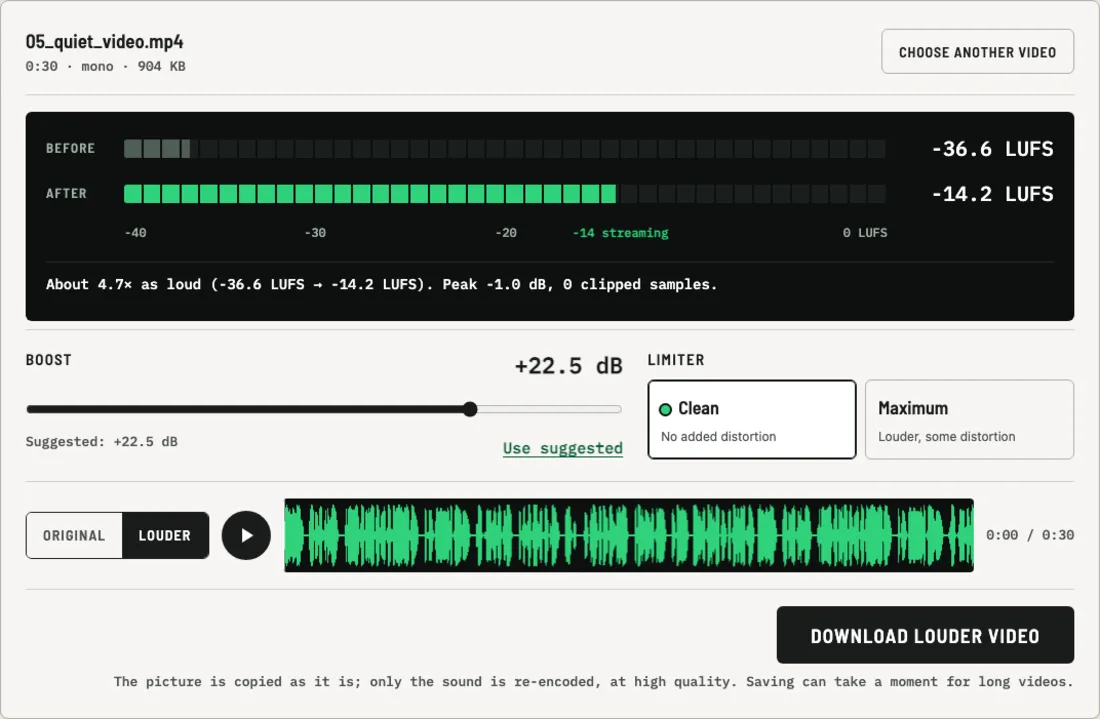
That is why this volume booster for video treats the two parts separately. It reads the sound track, makes it louder, and writes it back next to the original video stream. The video frames are copied byte for byte, so there is no second round of compression, no change in resolution, and no drift between sound and picture.
Why the louder video does not crackle
When a video editor simply turns up the gain, the loudest moments, such as laughter, a door slam or the wind, go past the top of the digital scale and get cut off. You hear that as crackling.
LouderKit uses a look-ahead limiter instead. It looks 5 milliseconds ahead, finds the peaks that would go over the ceiling, and lowers the level smoothly for just those moments. The rest of the sound gets the full boost. In Clean mode the result stays below −1 dB true peak. Maximum mode adds gentle saturation to squeeze out extra loudness and tells you that it adds some distortion, so you can compare both and choose.
Make a video louder online in your browser
There is no upload and no queue. The time it takes depends on the length of the video and your device. Longer videos need more memory, because the whole sound track is kept in the browser while you work on it.
| Device | Largest video |
|---|---|
| Phone or tablet | About 250 MB or 15 minutes |
| Computer | About 1.2 GB or 90 minutes |
If a video is longer, trim it into parts first and boost each one.
What happens to the sound track
The boosted sound is encoded again at high quality. Encoding is needed because the samples have changed; the video stream itself is not touched. Multichannel sound keeps its channels. If the video has no sound track at all, LouderKit tells you instead of producing an empty file.
Good to know
- Need just the sound? The audio volume booster saves MP3 or WAV and works with voice memos, podcasts and music.
- Different clips at different volumes? Boost each clip so its loudness reading lands near the same number, for example around −14 LUFS. Clips at similar loudness sound even when played one after another.
- Keep the original. LouderKit saves a new file and never changes the one on your device.