What this audio volume booster does
LouderKit is an audio volume booster: it turns up the volume of an audio file and saves a new, louder copy. It is built for the everyday need to make audio louder: a lecture recorded from the back of the room, a voice memo where the speaker was far from the phone, a podcast take that came out quiet, or an MP3 that is softer than the rest of your playlist. You get a file that is louder on every speaker and every app, not just on your device.
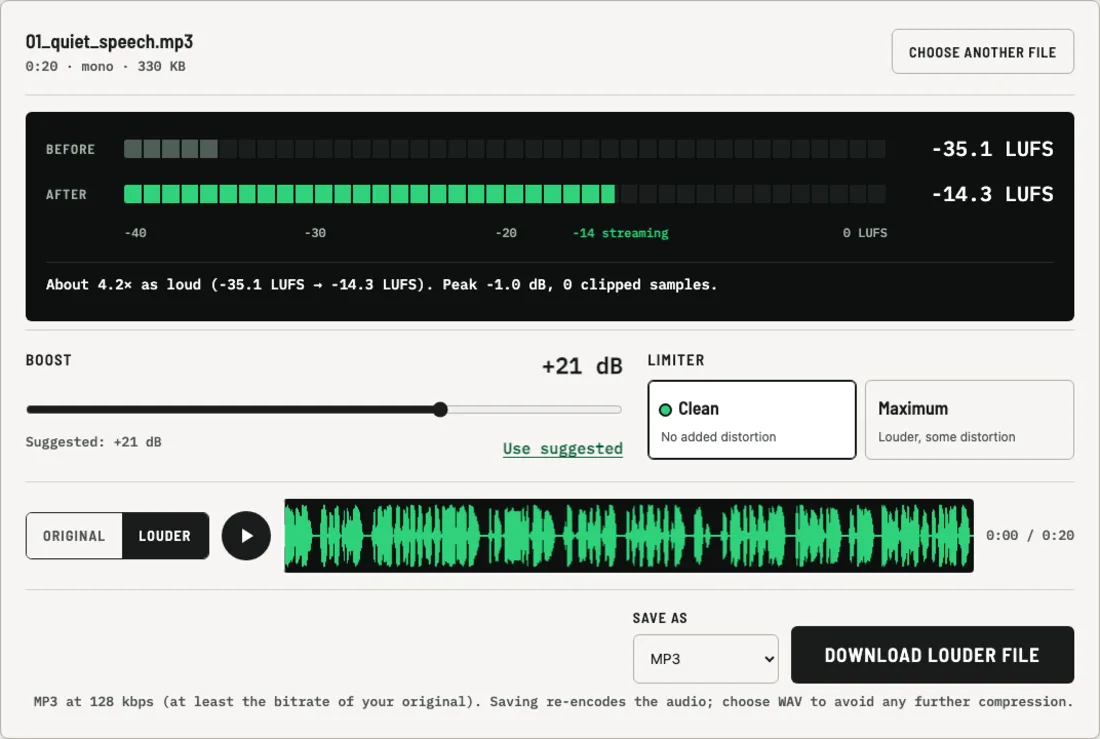
As soon as you open a file, LouderKit measures its loudness in LUFS, the unit streaming services use to compare loudness. It then suggests a boost that brings the file close to −14 LUFS, a common target for music and spoken audio online. You can accept the suggestion or set your own amount.
Why the boosted file does not distort
Turning up a digital file is easy. The hard part is what happens to the loudest moments. Once a peak goes past the top of the scale, a simple audio volume booster cuts it off flat, and you hear that as crackling or a harsh, buzzy edge.
LouderKit's Clean mode avoids this with a look-ahead limiter. It looks 5 milliseconds ahead, finds the peaks that would go over the ceiling (including peaks that fall between samples), and lowers the volume smoothly for just those moments. Everything else gets the full boost. The result stays below −1 dB true peak, and the meter reports the clipped-sample count after processing so you can check it yourself.
Maximum mode is for when you need every bit of loudness and can accept some coloration. It gently saturates the loudest parts before the limiter, which makes the file louder overall but adds some distortion. Use the Original / Louder switch to decide whether that trade is worth it for your recording.
How much louder will it sound?
| Boost | How it sounds |
|---|---|
| +3 dB | Slightly louder |
| +6 dB | Clearly louder |
| +10 dB | About twice as loud |
| +20 dB | About four times as loud |
These are rules of thumb for how people hear loudness. The real gain depends on your file: quiet speech can take +20 dB easily, while a finished pop song may only have room for 1 or 2 dB before the limiter has to step in. The before and after readings show you the actual change.
Boost MP3 volume without losing more quality than necessary
Like any MP3 volume booster, LouderKit has to decode the MP3, change the audio and encode it again. Every MP3 encode is lossy, so LouderKit picks an output bitrate at least as high as your original file's bitrate, up to 320 kbps. If you want no further compression at all, choose WAV before you download. A WAV is much larger but keeps the boosted audio exactly as it was processed.
Files this audio volume booster supports
- Audio formats: MP3, WAV, M4A, AAC, OGG, Opus, FLAC and AIFF, as long as your browser can decode the format.
- Output: MP3 (128–320 kbps) or 16-bit WAV, at up to 48 kHz.
- Size: up to about 80 MB on phones and 600 MB on computers. Very long recordings need a lot of memory, because the whole file is held in your browser while you work on it.
- Channels: mono stays mono and stereo stays stereo.
- Videos: to boost the sound of an MP4, MOV or WebM video and keep the picture, use the volume booster for video.
If LouderKit is not loading or working
LouderKit runs entirely inside your browser tab, so most problems come from the browser, an extension or the network, not from your file. Find what you see:
- louderkit.com does not open at all. Your network or DNS is failing, or the site is down. Try mobile data or another network. If it fails everywhere, email support@louderkit.com.
- The page opens, but choosing a file does nothing. JavaScript is off, or an extension is blocking scripts. Turn JavaScript on, pause ad or script blockers for louderkit.com, then reload.
- "Could not read this file." Your browser cannot decode this format, or the file is damaged. Convert it to MP3 or WAV first, or try Chrome.
- "On this device LouderKit can handle up to …" The file is longer than this device can hold in memory. Trim the file into parts, or use a computer.
- "Saving failed" when you save an MP3. The MP3 encoder, which loads from cdn.jsdelivr.net, was blocked. Choose WAV instead, or allow cdn.jsdelivr.net.
- "This browser cannot re-encode the sound inside a video." The browser lacks the audio encoder that video boosting needs. Use Chrome, Edge, Firefox, or Safari 26 or later.
- "Processing failed" or "Something went wrong." The tab ran out of memory or hit an error. Close other tabs, reload, and try a shorter file.
You do not need to install anything or create an account, and there is nothing to clear from a server, because your file is never uploaded. For more fixes, see LouderKit help. If a problem keeps coming back, tell us the browser, the device and the file type on the contact page. Comparing tools? See LouderKit alternatives.
Your file stays on your device
This audio volume booster runs entirely in your browser tab. The audio is not uploaded, stored or seen by anyone, which also means there is no upload to wait for and no queue. Closing the tab removes the file from memory.